Thursday, July 3, 2008

Sneek-peekers Virtual Quilt

Here are the blocks made by sneek peekers Amy, Little Deb, Kate, Laurie, Sandy and Sharon.

sharon5littledeb2littledeb3sharon6michelle8
KATE6.laurie3KATE4sharon4laurie4
michelle5laurie5KATE3laurie2sandy1
littledeb1littldeb6KATE5michelle7laurie8
michelle6littledeb4michelle1michelle2sharon3
michelle3sharon2sandy2littledeb5littledeb7
Amy3sharon1Amy4KATE1michelle4
Amy1Amy2littledeb8laurie7KATE2

Wednesday, July 2, 2008

rho's 1st Post in the Blogger


rho's test pix post


Ahhhhh, so let me be instructed, so let me be done!!!! I did it, I did it!! Thanks to you - Sophie and Amy! It seems that my first Blogger post is a success!!


When I traveled overseas, I took the beginnings of this quilt w/me, to make sure that I had something to keep the hands busy. I found a machine during my journey, after piecing some of these blocks by hand (albeit a "tredle"machine). With some instruction on how to properly us a treddle machine I completed 5 rows while I was out of the country.
Thanks again for the instructions and for your "gate opening" to E-Blogger!


rho

How to post a picture of your lotto blocks

Part I – posting a picture from your computer hard drive
(with shameless borrowing from Blogger’s help files!)

Once you're set up as a blog author on this blog, you're ready to post your lotto blocks! Be sure you have your picture loaded onto your hard drive somewhere before you start.

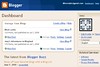
Go to blocklotto.blogspot.com, and click the Sign In link in the upper right corner. This will open your Blogger Dashboard. If you have your own blog on Blogger, or contribute to other group blogs, you’ll see them all listed here. If you’re only contributing to the Block Lotto blog, you’ll only see it listed in the Manage Your Blogs section. Here’s what mine looks like; yours might have fewer options for what you can manage:

Dashboard
(all the images in this post are clickable for a bigger version)
To post your photo(s), you’ll need to make a New Post. From the Dashboard window, click on +New Post.

New post

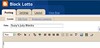
That will open a page with a post editor. In many ways, this is similar to how the forum works – you’ll see a space for writing any text, and some tools for editing the text and posting pictures. (Please use only the DEFAULT settings for font, font size and color.)

new post window

First, create a title for your post in the Title box. Please include your name and/or your forum name in your post – something like Suzy’s July Blocks.

Now for the fun part!

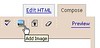
Click the Add Image button on the editing toolbar. It looks like a little picture.

add image

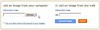
This opens a new window that allows you to select the image(s) from your computer. For this tutorial, we’ll use the Add an image from your computer option. Click the Browse… button to locate your image on your hard drive.

browse

Once you’ve found your image, click Open (weird, I know!), and you’ll return to the Blogger window. Now, click the big orange Upload Image button in the bottom left.

upload

Blogger will think for a moment, then return with Your image has been added. Click the blue Done button to return to your post.

done

Now, you’ll see your image in the text editor. (WHEW!)

If you want to write a message about your blocks, now’s the time to do it. Just type it into the editing box.

To add a label to your post (this makes it easier to search for all the photos from a given month), click the Show All link to the right of the Labels field:

labels

This will give you the list of available tags. Choose july blocks for this month, and sampler (not shown in this image).

show labels

One last step, and you’re done! Click the big orange Publish Post button.

publish

You'll get this last window confirming your post was successful -- click the View Blog link to see your picture on the blog!
success

Kate's Lotto Blocks


Here are six different blocks for this month's lotto - an Ohio Star, Churn Dash, Double Four Patch in the top row; a Four Patch variation, Broken Dishes and Birds in the Air in the bottom row.

Tuesday, July 1, 2008

Amy's July Blocks

July Lotto blocks

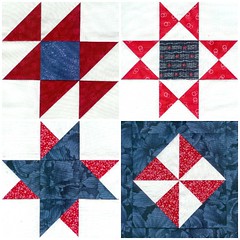
Double X variation, Ohio Star, Double Friendship Star and floating Pinwheel, all made by Amy (AJB30).

All from my scrap bins!

Quilter's Choice in Red, White and Blue

For July, the lotto block is . . . your choice ;-)

I thought it would be fun for everyone to make their favorite block OR to make their "go to block" OR to make a block that they think would make a great lotto block pick in the future.

The guidelines for your block choice this month are these:

All blocks should be 6.5 inches (6 inches finished size).

All blocks should contain at least three fabrics: one red, one white, one blue. These can be solids, tone-on-tone prints, or multi-color prints that are predominately red, white and blue. So, if you choose a pattern that is usually two fabrics, you will have to be creative to add the third fabric.

Pieced blocks must contain at least 7 pieces.

Applique blocks must have turned under edges.

As always, you can enter up to 8 blocks. Up to four of these may use the same block pattern . . . so, for example, you could make 4 stamp basket blocks and 4 ohio star blocks. You should do the usual thing and use different fabrics so that our winners this month end up with wonderful scrappy red, white and blue sampler quilts.

Monday, June 30, 2008

June winners

The winners of our June Basket Blocks are:

Kelly (mingtoy52)

Sharon (lea2oh)

Annette (annettejeavons)

Congratulations, ladies!!

The Rest of the Basket Blocks

LIFE has been in the way . . . and I'm playing catch up . . .

Here are Laurie's (nlaurie) 8 baskets.


And six from Michelle (momof11)


THen she found some more black and white fabric and made two more.


And one basket from the self-proclaimed slacker, Sandy (centergranny).


Four from Ellen.


Rho (rhonda11) made eight blocks.


Karen (bittieshop) made a DOZEN blocks.


and Annette (annettejeavons) made these blocks.

Tuesday, June 17, 2008

Basket Blocks from Maz

Maz struggled and made a cocktail and struggled some more and made these beautiful 8 blocks.


Our new total so far this month is 94 blocks.